What is Included in this Complete Project Package:
✓
Complete Flutter Cross-Platform App Source Code (.ZIP)
✓
Clean UI Screen Architecture, Reusable Widgets & State Management
✓
Direct Git Repository Access (GitHub/GitLab)
✓
App Assets, Custom Icons, Vector Graphics & Config (pubspec.yaml)
✓
Step-by-step Flutter & Android Studio / VS Code Setup Guide
✓
Documentation & App Architecture Notes
📖 Project Overview
# AIHub Studio — All-in-One AI Productivity & Creative Suite
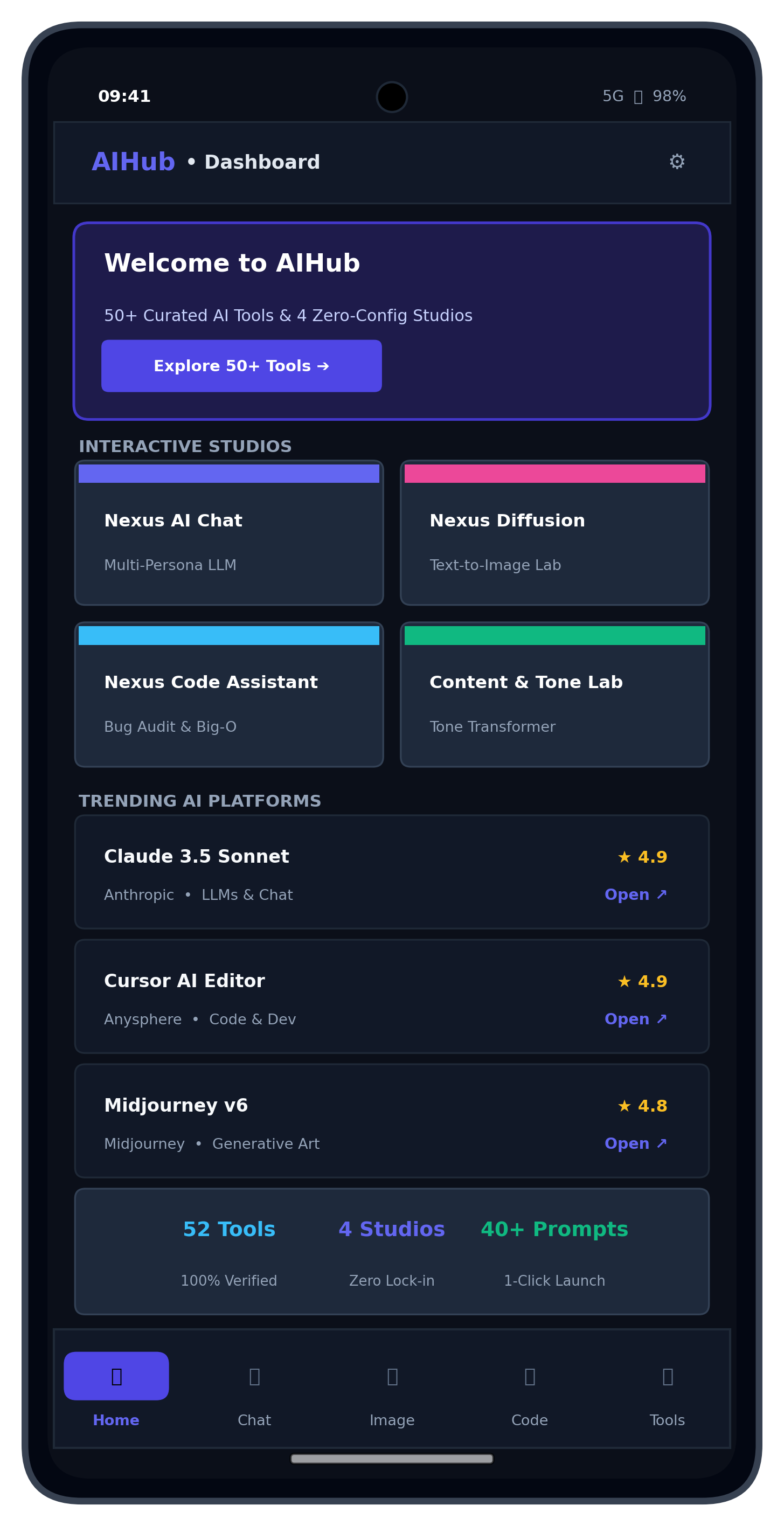
**AIHub Studio** is a full-featured, cross-platform generative AI workspace engineered with Flutter and Dart. Designed with a privacy-first, on-device architecture, AIHub brings together conversational AI, developer code intelligence, content creation, image diffusion, and curated AI discovery under one unified, responsive interface.
### 🌟 Core Modules & Capabilities
1. **💬 AI Chat Studio:**
- Multi-persona conversational engine (Software Architect, Creative Writer, Business Consultant, General AI).
- Real-time response streaming and contextual conversational memory.
- On-device local chat history storage and export.
2. **💻 Code Studio:**
- Developer workstation for code analysis, bug detection, and optimization.
- Intelligent code translation across multiple languages (Dart, Python, JavaScript, Java, C++, Go, Rust).
- Clean markdown code blocks with copy-to-clipboard functionality.
3. **✍️ Writer Studio:**
- Content generation lab for blogs, emails, essays, summaries, and copywriting.
- Tone and style adaptability (Professional, Casual, Academic, Persuasive).
- Instant text expansion, rewriting, and summarization pipelines.
4. **🎨 Image Gen Studio:**
- Text-to-image diffusion powered by Pollinations AI.
- Built-in style presets (Photorealistic, Anime, Cyberpunk, 3D Render, Oil Painting).
- One-click image download and gallery preview.
5. **🗃️ Prompt Vault:**
- Curated repository of battle-tested prompts for engineering, marketing, and writing.
- Personal prompt manager: create, tag, favorite, search, and reuse high-performing prompts.
6. **🧭 Curated AI Tools Directory:**
- Centralized catalog of leading industry AI tools with categorization and instant search.
- Bookmarking system and direct external link launching.
7. **⚙️ Customization & Theming:**
- Dynamic dark and light themes with 8 custom accent color palettes.
- Bring-Your-Own-Key (BYOK) settings for Google Gemini and OpenAI with persistent on-device encryption.
8. **🛡️ Generative AI Safety & Guardrails:**
- Automated client-side moderation guardrails (`ContentFilterService`) blocking profanity, violent, and inappropriate prompts.
- Safe-mode enforcement and in-app content reporting dialog compliant with Google Play Store AI content policies.
### 🏗️ Technical Architecture & Highlights
- **Framework:** Flutter (Dart SDK ^3.13.3)
- **State Management:** Provider pattern (clean MVVM separation of concerns)
- **Network Layer:** Direct HTTP REST communication with Gemini 1.5 Flash and Pollinations APIs
- **Storage Layer:** Fast on-device persistence via `shared_preferences` — **Zero external database setup or MySQL configuration required for students!**
- **Fallback Engine:** Built-in high-fidelity contextual response generator ensuring app functionality even without external API credentials.
- **Responsive Layout:** Adaptive breakpoints supporting mobile screens, tablets, and desktop/web viewports.
### 📦 What You Get in This Package
- **Complete Flutter & Dart Source Code** (100% clean, commented, and null-safe).
- **Architecture & DFD Diagrams** (Data Flow Diagrams Level 0, 1, 2, and sitemap diagrams included).
- **Google Play Store Release Assets** (App icon, 1024x500 feature graphic, and phone screenshots).
- **Privacy Policy Template & HTML** (Google Play compliant).
- **Step-by-Step Setup Guide & Documentation**.
### 🚀 Quick Start & Installation
1. **Prerequisites:** Install Flutter SDK (v3.13.3 or higher) and Android Studio / VS Code.
2. **Extract Package:** Unzip `AIHub_Studio_Complete_Package.zip` into your development folder.
3. **Fetch Dependencies:**
flutter pub get
4. **Run the App:**
flutter run
5. **Build APK / App Bundle:**
flutter build apk --release
flutter build appbundle --release